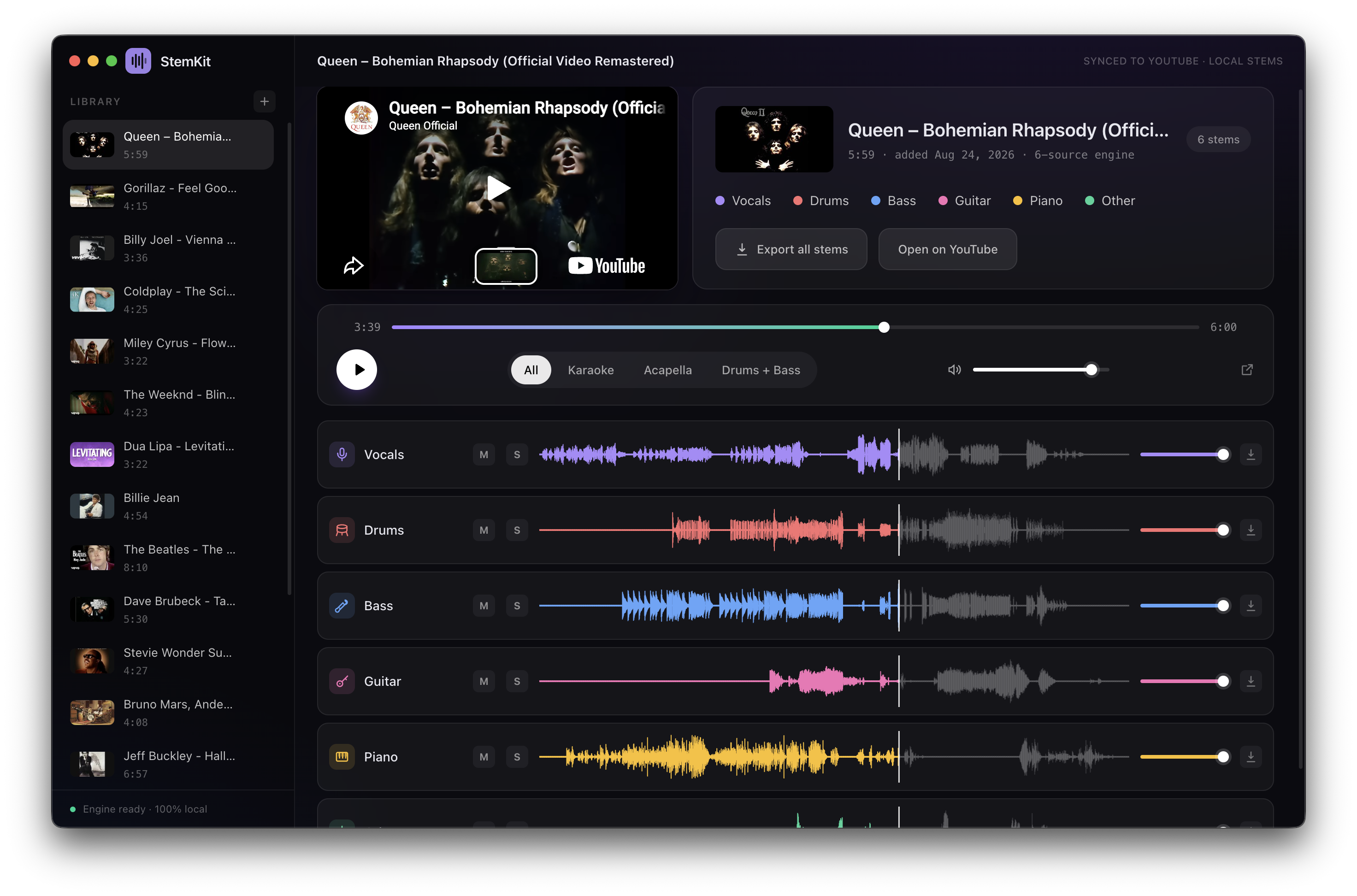

Split any YouTube song into isolated stems — vocals, drums, bass, guitar, piano and more — right on your machine.
Search YouTube or paste a link, pick the instruments you want, and play the result like a mini DAW: the video on one side, every stem on its own fader, all perfectly in sync. Karaoke, acapellas and instrumentals are one click away.
Everything runs locally — no accounts, no API keys. Your songs, searches and audio never leave your machine. The app sends a single tiny anonymous ping per install (a random install id + version/OS) so I can count how many people use it — see Privacy for details.



- Built-in YouTube search, or paste a link
- Choose your instruments individually; the right separation engine is picked for you
- Tight audio/video sync with instant, artifact-free seeking
- One-click presets: All · Karaoke · Acapella · Drums + Bass
- Per-stem mute/solo/volume, waveforms with click-to-seek
- Parallel background splitting with live progress
- Export checked stems mixed into one file or separately, with mixer volume/pan and original or shifted pitch (WAV, or AAC in Settings)
- Detected song key (editable) and live pitch shift (±6 semitones)
- Fully offline after setup — separation runs on Mac (MPS), NVIDIA GPUs (CUDA), AMD GPUs on Linux (ROCm, experimental) or CPU; ffmpeg included
Grab installers from Releases:
- macOS:
StemKit-x.y.z-mac-arm64.dmg(Apple Silicon) orStemKit-x.y.z-mac-x64.dmg(Intel) - Windows:
StemKit-Setup-x.y.z.exe(installer) or portable.zip - Linux (x64):
StemKit-x.y.z-linux-x86_64.AppImage(portable, self-updating) orStemKit-x.y.z-linux-amd64.deb
First launch creates a private Python environment and downloads the separation engine (~2 GB) — one time. ffmpeg is bundled — nothing else to install.
Optional quality upgrades live behind a gear icon in the app (Settings), each with its own one-time download:
- Studio-quality vocals (Mel-Band Roformer): +913 MB — runs on GPU or CPU (CPU is slower)
- Fine-tuned demucs (htdemucs_ft): +~320 MB, up to 4× slower
- Refinement passes: 2 shifts instead of 1, up to 3× slower
macOS first launch: builds are signed with a Developer ID but not notarized, so macOS may say it "cannot verify the developer". One-time fix: System Settings → Privacy & Security → Open Anyway (or
xattr -cr /Applications/StemKit.app).Windows: SmartScreen may warn on first run — "More info → Run anyway".
- macOS 12+ (Apple Silicon or Intel x86_64) or Windows 10/11 (x64) or Linux x64 (Ubuntu 22.04+ or equivalent; NVIDIA driver for GPU splits, AMD via ROCm on Linux — experimental)
- No manual installs: if no Python 3.9+ is detected, StemKit downloads a private runtime (python-build-standalone) during first-launch setup
- Node.js 24+ only for building from source
Intel Mac: PyTorch publishes no macOS x86_64 wheels past 2.2.2, so first-launch setup installs that build instead of the 2.5.1 used everywhere else. MPS is still available on that build when the machine has a Metal-capable GPU (verified on an Intel Mac with a discrete GPU); integrated-only Macs fall back to CPU.
npm install
npm run dev
Wrong Node version? Scripts auto-relaunch with a suitable one (nvm / nvm-windows).
bash scripts/fetch-ffmpeg.sh        # mac (compiles arm64 + x86_64 ffmpeg + libsoxr, needs cmake) / linux (one time)
powershell scripts/fetch-ffmpeg.ps1 # windows (one time)

npm run dist        # mac dmg -> release/
npm run dist:win    # windows nsis+zip -> release/
npm run dist:linux  # linux AppImage+deb (x64) -> release/
npm run dist:all # both (on the matching OS)Linux: building the
.debneedsdpkg+fakerooton the host; running the.AppImageneeds FUSE. In-app self-update works on the AppImage —.debinstalls update by re-downloading.
Releases are built by GitHub Actions:
- push a tag
v*→ binaries attach to a draft GitHub Release workflow_dispatch("Run workflow") → on-demand artifacts on the run page
macOS builds are Developer-ID-signed when the certificate is available — see Signing in CI below for the one-time setup, plus optional notarization.
Local builds sign with your keychain cert automatically. CI runners have empty keychains, so hand them the certificate via repo secrets:
- Keychain Access → My Certificates → right-click
Developer ID Application: ...→ Export →.p12(set an export password) - Base64 it and add these repo secrets:
CSC_MAC_P12— the base64 string:base64 -i developer-id.p12 | pbcopyCSC_MAC_PASSWORD— the export password from step 1
- Optional (full notarization, zero Gatekeeper prompts): add
APPLE_ID,APPLE_APP_SPECIFIC_PASSWORD,APPLE_TEAM_IDand set repo variableENABLE_NOTARIZATIONtotrue(Settings → Secrets and variables → Actions → Variables). Requires an active Apple Developer membership — Apple's notary service rejects expired accounts.
Without these secrets CI falls back to ad-hoc signing (app runs, but Gatekeeper complains on download).
YouTube URL ──► yt-dlp (+JS runtime) ──► bundled ffmpeg ──► mel-band roformer (vocals) ─┐
                                        │                                               ├─► stems/*.wav
                                        └─────────────► demucs htdemucs ────────────────┘
                                             (drums/bass/other, shift-averaged)

Electron renderer ◄──── IPC events ─────┘
video iframe (muted) + Web Audio stem playback · master clock = the audio itself
- Downloading audio from YouTube violates their ToS for public products — keep this personal.
- Want the data somewhere else (venv, models, songs, library)? Start the app with
STEMKIT_DATA_DIR=/path/to/folderset. Unset keeps the default app folder. - yt-dlp breaks occasionally when YouTube changes things; the error dialog offers a one-click update (updates
yt-dlp+ the challenge solver together).
- Never leaves your machine: the videos you download, the songs you split, your library, your searches and your audio — none of it is uploaded anywhere. All separation runs locally.
- Anonymous install count: the first time the app runs it sends one small POST to a Cloudflare Worker (
stemkit-stats.danielravina.workers.dev) — once per install, ever. It contains a random install id (generated locally, stored in the app's settings folder), the app version, OS and architecture. No IP-address-based profiles are built, no cookies, no identifiers tied to you, no analytics SDKs. If the first attempt fails (e.g. you're offline), it simply retries on a later launch. - What it's for: counting installs and active usage (the same stats you'd get from GitHub release downloads, minus auto-update noise). The counter code is in
telemetry-worker/— inspectable like the rest of the app. - Fully offline builds: if you'd rather send nothing, build from source and remove
src/main/telemetry.ts(or block the worker domain in your firewall) — everything else works identically offline.
src/main         Electron main process (pipeline, env bootstrap, library)
src/preload      IPC bridge
src/renderer     React UI (player, sync engine, waveforms)
python/          separate.py (demucs) and roformer.py (neural vocals) with JSON progress output
python/vendor/   patched model code — see python/vendor/README.md
scripts/         node runner, ffmpeg fetchers
build/           icon sources